Business Tips
Launching your Memberships
Alex Dinh
Oct 16, 2025
This guide will walk you through how to create engaging content, set up promotions, and use discounts to generate excitement and attract more supporters from day one.

So, you’ve set up your membership tiers, added perks, and displayed them beautifully on your homepage — great start! Now it’s time to take things up a notch and officially launch.
This guide will walk you through how to create engaging content, set up promotions, and use discounts to generate excitement and attract more supporters from day one.
Step 1: Create Engaging Content
You don’t have to post content right away, but having at least one post ready before launch helps make new members feel welcome and adds a personal touch to your community.
Whether you plan to share exclusive updates, videos, or behind-the-scenes moments — or just want to keep things simple — here’s how to get started.
Create a Welcome post
A welcome post is the first thing new members see when they join. It’s shown at the top of their feed for 24 hours (and always accessible later from their Perks tab).
To set one up, go to: Memberships → Settings → Welcome post.
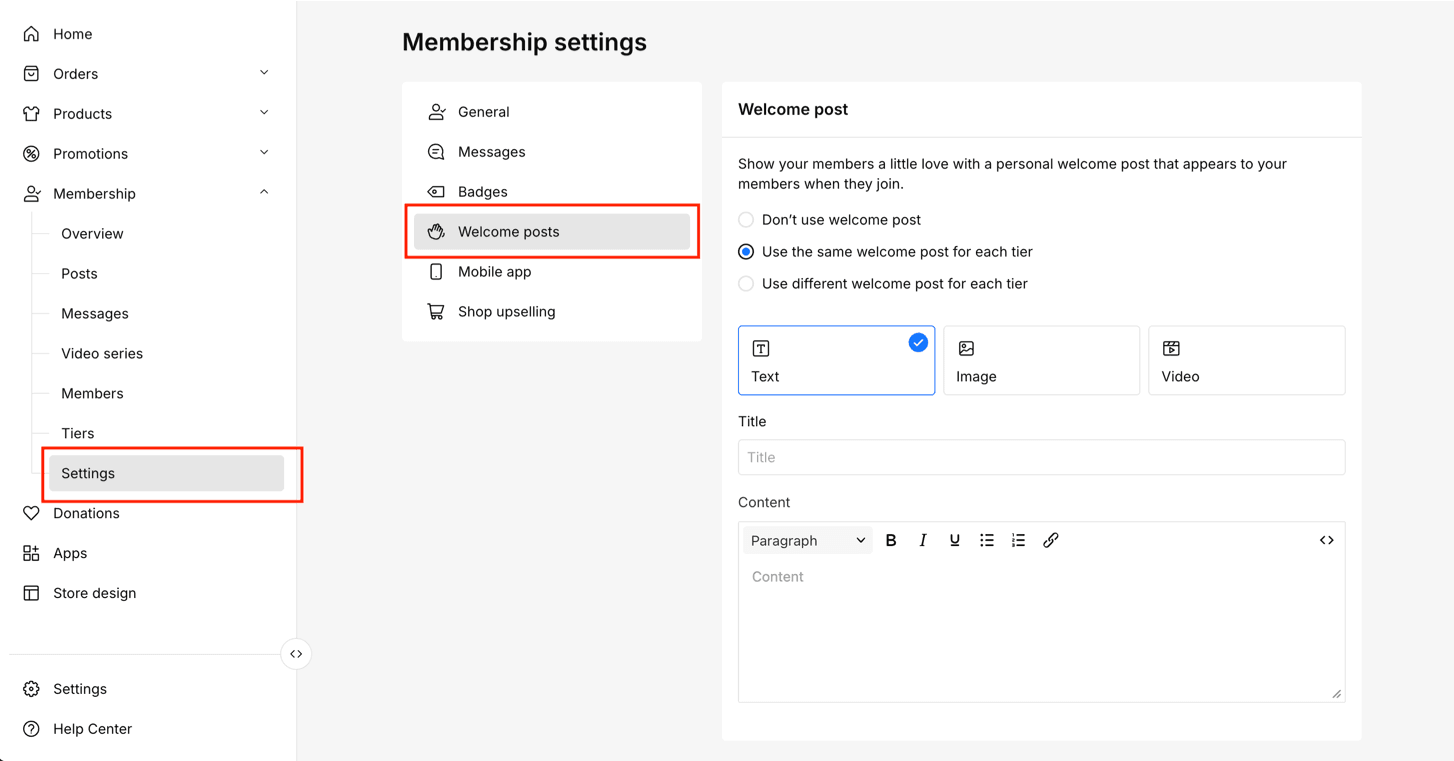
Then choose one of the following options:
No welcome post – skip the greeting altogether
Same post for all tiers – one message shown to everyone
Different posts per tier – customize your greeting for each membership level
Once you decide, choose your post format:
Text – share a personal note
Image – upload a visual or branded graphic
Video – record a warm video message
Click Save when you’re done — and your welcome post is live!
Step 2: Share Members-Only Posts
Keep your members engaged by sharing exclusive updates or rewards.
Go to Memberships → Posts → Create New Post, and you can add text, images, videos, audio clips, or polls.
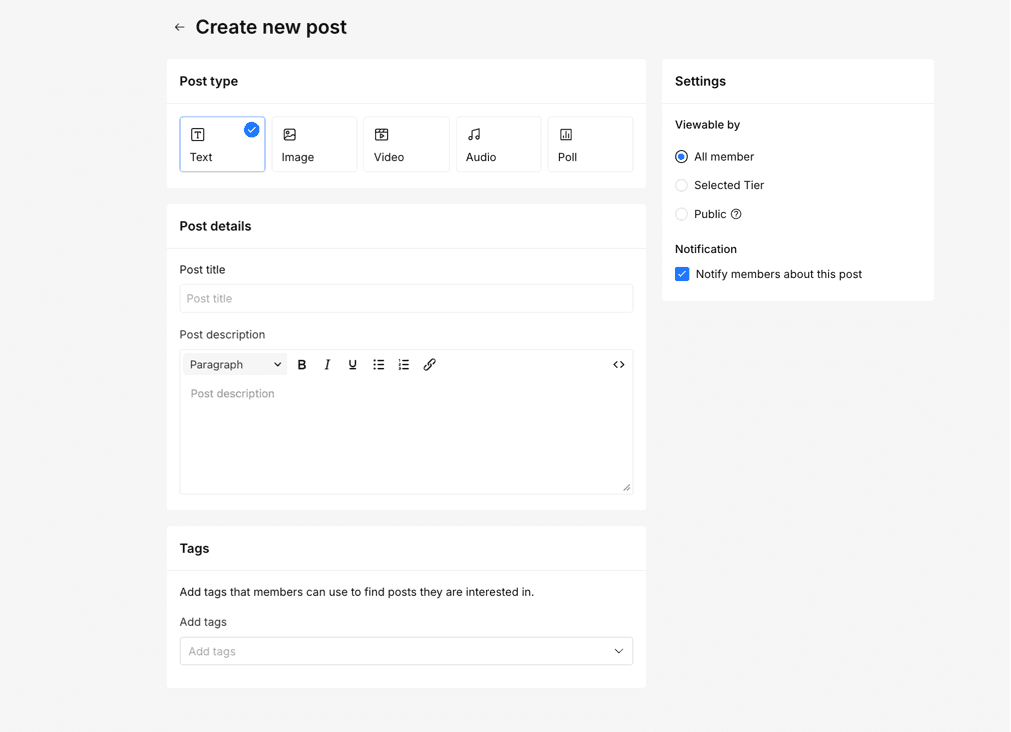
Each post includes options for:
Title & Description – make it catchy and clear
Tags – organize posts by topic or theme
Permissions – choose who can see it (all members, specific tiers, or everyone)
Notifications – decide if members get alerts when you post
Posting regularly keeps your community active and connected.
Step 3: Run Promotions
Enable Annual Subscriptions
Offering annual subscriptions helps you build long-term commitment and steady revenue.
To set it up, go to Memberships → Settings → General → Check Offer annual subscription → Set your discount percentage.

Example:
Monthly: $10
Annual discount: 20%
Annual price: $96 (calculated automatically)
Your members will see both monthly and annual options at checkout.
Offer launch discounts
Want to boost sign-ups when you launch? Give new members a special one-time discount!
To enable:
Go to Memberships → Perks & Tiers
Click the Setting icon → Edit Tier
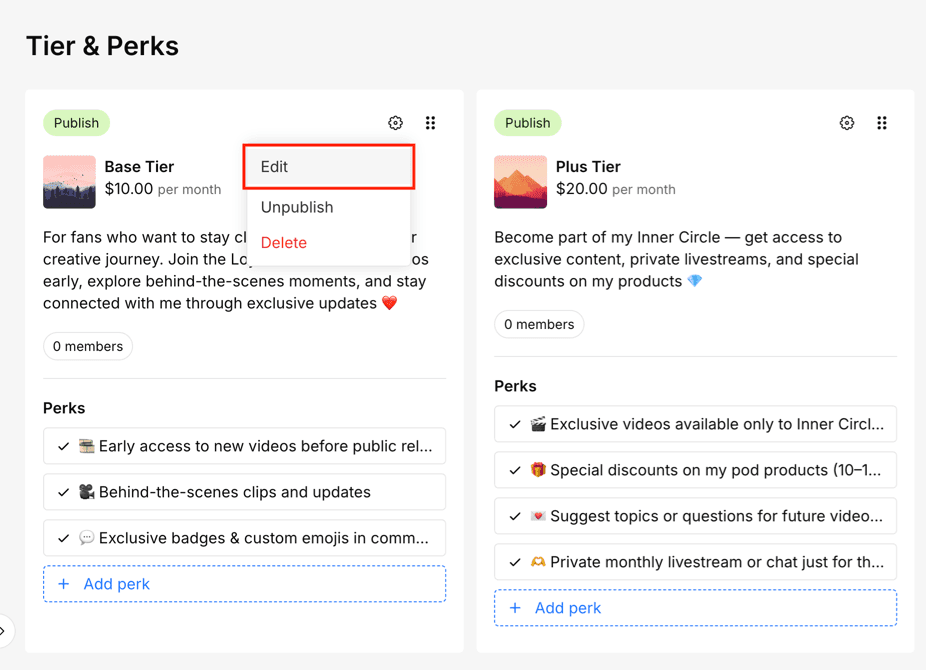
Check Offer one-time discount
Set the discount amount (monthly and annual)
(Optional) Set a time limit for the offer

💡 Tip: This works especially well for launches, holidays, or limited-time events.
Step 4: Go Live and Announce Your Launch
Once your content, discounts, and settings are in place — it’s showtime!
Promote your memberships on:
Your homepage or store
Social media (Instagram, YouTube, TikTok, etc.)
Email newsletters
Highlight what makes your tiers valuable — exclusive content, perks, or early access — and invite your fans to be part of your community from the start.
You’re Ready!
You’ve done the hard work — now it’s time to launch confidently and start building your membership community.
If you need any help, contact us here and we’ll be happy to assist you.

Written by
Alex Dinh
Alex Dinh is a software engineer and tech blogger with over 8 years of experience. His blog offers coding tips, product reviews, and tech guides, while also supporting young developers in kickstarting their careers.